How to Use the Facebook Comments Plug-in on Your Business's Website
The Facebook Comments plug-in allows you to add an interactive posting and discussion feature to specific pages on your website. The most popular way that this plug-in is used is to allow users to add their comments to your blog site.
Encouraging your website or blog readers to leave comments on your site is important, because it allows users to share their thoughts and be heard, and also gives them an opportunity to connect with other users of your site. Further, comments act as social proof for your site, because the perceived value of your content increases as the number of comments increases.
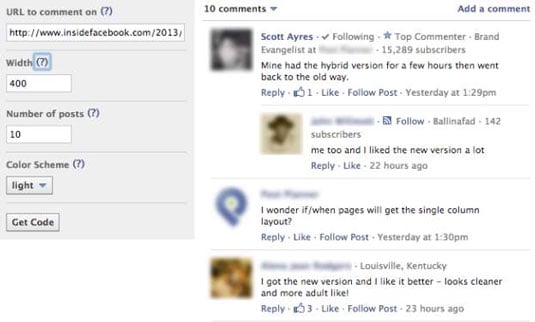
When you use the Facebook Comments plug-in, your visitors who leave a comment have a few options: They can leave a comment as their Facebook Profile or as any Page they administer, or they can also choose to have their comment posted to their Facebook Timeline (on their Profile or Page, depending whether they posted as their Profile or their Page).
When they leave the Post to Facebook check box selected, a story publishes to the News Feeds of their Friends or fans. This option increases the visibility of content on your site, because the story links back to your blog post or website.
What makes Facebook Comments different from other blog-commenting systems is that the comments are posted on your blog site as well as on Facebook. This allows Friends and fans to respond to the discussion by liking or replying to the comment directly in their News Feeds on Facebook or in the comments area of your blog site.
Also, threads (strings of conversations in the comments area) from inside Facebook and from the comments area of your website stay synchronized, meaning that no matter where the comment is made for the original blog post, it always shows up in your comments box and on Facebook. The conversations are indented, making it easy to identify separate conversations.
All the likes on the comments are synced in both places. The viral exposure from this plug-in is extremely powerful.
The Facebook Comments box also uses social relevance to order the blog comments. That means that each user logged in to Facebook sees what Facebook calls relevant and interesting comments — comments made by the user’s Friends and Friends of Friends, as well as the most liked and active discussions — at the top of the Comments box.
The comments that Susie would see at the top of a Facebook Comments box would be different from the comments that Sally would see because Susie and Sally have different Friends and connections on Facebook. The experience is personalized for everyone.
You have multiple ways to optimize the comments system on your site:
Enable the Comments plug-in in multiple areas on your website, including specific web pages, articles, photos, and videos. This allows your users to interact with your site in more ways than one.
Respond to your users’ comments often and in real time when possible. This allows you to create one-on-one relationships with the visitors to your site.
Encourage users to post comments by asking for their feedback about your article, video, photo, and so on or by asking a question at the end of your post.
If your site doesn’t already offer comment functionality, or if you’re using a comment system that’s getting minimal interaction, consider installing a Comments plug-in. You have great potential for your online exposure to increase as users share their comments on your site.