
How to Use Developer Tools in Safari on iOS
Enabling the Debug Console in Safari on iPhone, iPod touch, or iPad allows you to see HTML, CSS, and JavaScript errors directly in the device. This is the most reliable way to ensure that you have no surprise issues to resolve when you do your final testing.
To enable the Debug Console in Safari, follow these instructions.
1
Tap the Settings icon on the iPhone or iPad desktop.
The Settings screen opens.
2
Tap to choose Safari from the list of software available on your device.
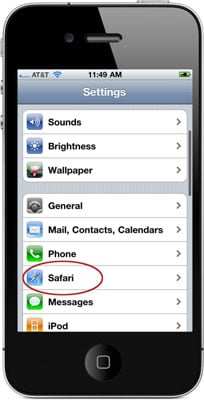
The Safari Settings screen opens.
3
Scroll to the bottom of the screen and then tap Developer.
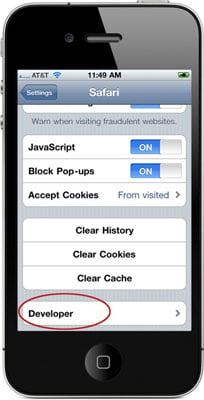
The Developer screen appears.
4
Touch the On button to activate the Debug Console.
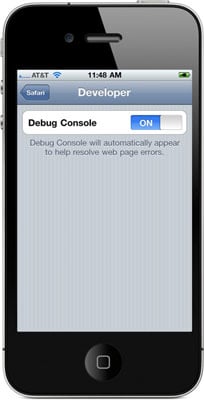
After the Debug Console is enabled, Safari reports any errors it encounters when accessing a website. At the top of every web page, just under the address bar, the Debug Console reports any HTML, JavaScript, or CSS errors.
Long log entries are now truncated to fit the space available in the Debug Console. For best results, when using the Debug Console to track JavaScript log events in Safari on iPhone or iPod touch, keep your log entries short.

Web Design & Development Glossary
AJAX
asynchronous JavaScript and XML. A technique used in web page development.

Web Design & Development Glossary
API
application programming interface. A set of rules programs use to communicate with each other.

Web Design & Development Glossary
color stop
A special element that indicates a color to be added to a gradient.

Web Design & Development Glossary
FTP
File Transfer Protocol. A network protocol useful for transferring files in a client-server relationship.

Web Design & Development Glossary
HTML
HyperText Markup Language. The predominant language for building web pages.

Web Design & Development Glossary
HTTP
HyperText Transfer Protocol. The primary networking language for the Internet.

Web Design & Development Glossary
PHP
PHP Hypertext Processor. A scripting language that works well within HTML.

Web Design & Development Glossary
socket
A technology that allows remote computers to maintain a persistent connection in order to communicate with each other.

Web Design & Development Glossary
sprite
An graphic object on a web page that will be manipulated in real time.

Web Design & Development Glossary
SQL
Structured Query Language. A programming language useful in managing relational databases.

Web Design & Development Glossary
stateless protocol
An Internet procedure that completely breaks the connection between the client and the server after a transaction, meaning that the next transaction will require an entirely new connection.

Web Design & Development Glossary
Telnet
A network protocol useful in interactive, text-oriented communications.

Web Design & Development Glossary
W3C
World Wide Web Consortium. The organization that sets international standards for the World Wide Web.