

How to Segment Web Marketing Keyword Lists by Destination URLs
When you have a complete web marketing keyword list organized by ad groups and match types, you can segment the list even further. This situation applies if you want to drive visitors to a specific product or place, but starting a separate ad group doesn’t make sense.
Some of the keywords indicate specific colors for rose wedding invitations: red and pink. Rather than drop visitors off the product page for rose wedding invitations, you can take them one click further by using a keyword destination URL for each color.
Select the URL for the product page of the pink rose wedding invitation, for example, and direct visitors there specifically for the keywords pink rose wedding invitation and pink rose wedding invites.This strategy works especially well if you have only one type of product but still want to have the keyword so that when someone does search on it, your ad appears.
Both Google and MSN offer keyword destination URL targeting:
Google: You have to use the offline AdWords Desktop Editor or go through an export and import of an Excel spreadsheet using the AdWords template.
The desktop editor is a free download from Google AdWords and is the easier choice.
MSN: Follow these steps:
Log in to your adCenter account and click the ad group’s name to open the ad group.
Click the Keywords tab to open the entire keyword list for that ad group.
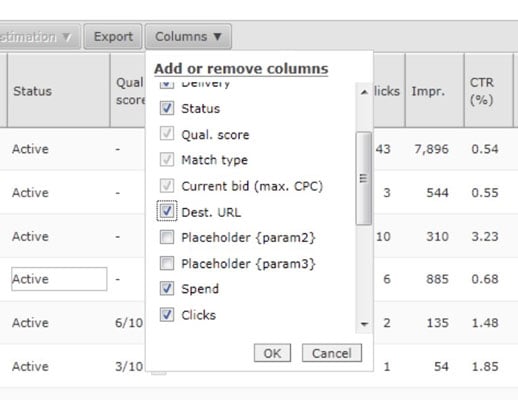
Click the Columns button in the navigation area and select the Dest. URL check box. Then click OK.
The Destination URL field now is visible.
Click the keyword(s) that you want to add a keyword-level destination URL to.
Enter the URL and click the Save button.
Web Design & Development Glossary
AJAX
asynchronous JavaScript and XML. A technique used in web page development.

Web Design & Development Glossary
API
application programming interface. A set of rules programs use to communicate with each other.

Web Design & Development Glossary
color stop
A special element that indicates a color to be added to a gradient.

Web Design & Development Glossary
FTP
File Transfer Protocol. A network protocol useful for transferring files in a client-server relationship.

Web Design & Development Glossary
HTML
HyperText Markup Language. The predominant language for building web pages.

Web Design & Development Glossary
HTTP
HyperText Transfer Protocol. The primary networking language for the Internet.

Web Design & Development Glossary
PHP
PHP Hypertext Processor. A scripting language that works well within HTML.

Web Design & Development Glossary
socket
A technology that allows remote computers to maintain a persistent connection in order to communicate with each other.

Web Design & Development Glossary
sprite
An graphic object on a web page that will be manipulated in real time.

Web Design & Development Glossary
SQL
Structured Query Language. A programming language useful in managing relational databases.

Web Design & Development Glossary
stateless protocol
An Internet procedure that completely breaks the connection between the client and the server after a transaction, meaning that the next transaction will require an entirely new connection.

Web Design & Development Glossary
Telnet
A network protocol useful in interactive, text-oriented communications.

Web Design & Development Glossary
W3C
World Wide Web Consortium. The organization that sets international standards for the World Wide Web.