

After you join a LinkedIn group, you'll probably want to see who's in the group and how the group members are connected to you. After all, the point of these groups is to stay in touch with like-minded individuals and have them be part of your extended network.
To search a group, follow these steps:
From the top navigation bar, hover your mouse over the Interests link and then click the Groups link in the drop-down list that appears.
Your Groups page appears.
Look through the list of groups on this page, scroll down to the group's logo, and click that logo to bring up the Groups home page. On the page, click the link that contains the number of members in the group. (This link is to the left of the Member button.)
This brings up a search result of the members in the group, sorted by how many degrees they are away from you in your LinkedIn network.
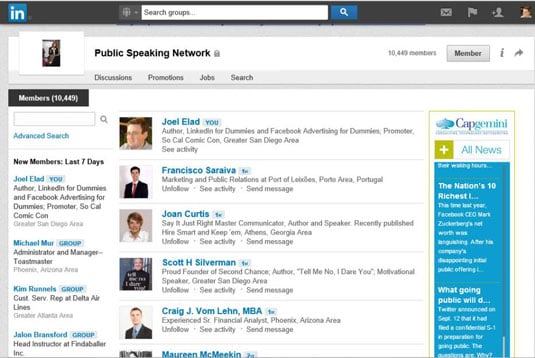
After you are on the search results screen, on the left-hand side of the screen, you can click the Advanced Search link and add other search criteria to get a more targeted results list.
This brings up an Advanced Search Results page, and you can see that the search is automatically limited to members of your group. Now you can scroll down the page and use more of the filters provided as search requirements, such as names, companies, user types, and locations.
Click the Search button.
Your search is carried out according to the refined search criteria you entered.