


The day might come when you feel you need to remove someone from your LinkedIn network. Perhaps you added the person in haste, or he repeatedly asks you for favors or introduction requests. Simply remove the connection. When you do so, that person can no longer view your network or send you messages, unless he pays to send you an InMail message.
To remove a connection from your network, just follow these steps:
While logged in to your LinkedIn account, click the Network link from the top navigation bar.
Choose Contacts from the menu that appears to bring up your list of connections.
Scroll through the list to find the connection you wish to remove.
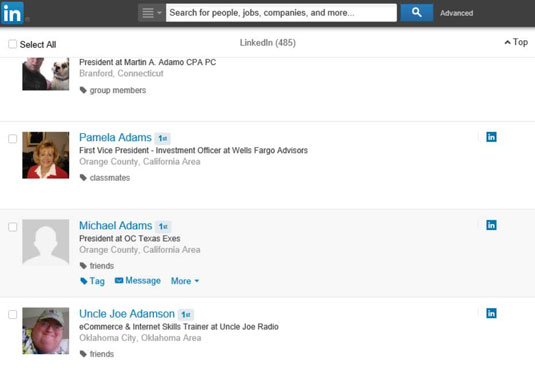
When you hover your mouse over the connection’s name, you see the Tag, Message, and More links appear below the person’s name and headline.
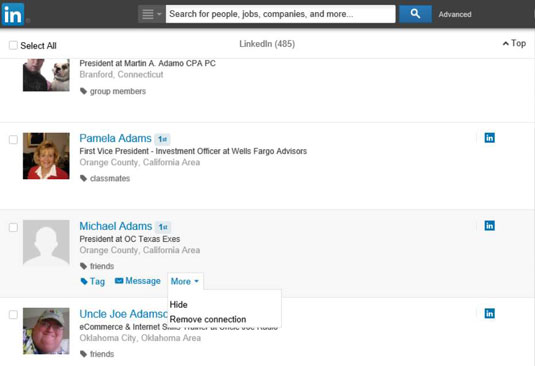
Click the drop-down arrow next to the More link, and then select Remove Connection from the drop-down list that appears.
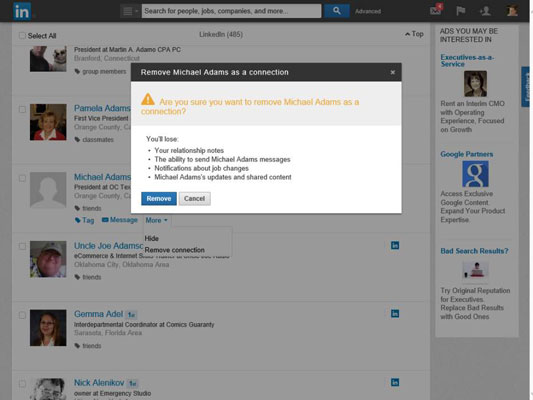
A pop-up box appears, warning you of what abilities you’ll lose with this removal and asking you to confirm you want to remove the connection.
Click the Remove button to remove this person from your network.
Your removed connection won’t be notified of the removal.


