

How to Post Online Marketing Content to Google+
In order to generate interest in your online marketing campaign, you may need to post content to Google+. Posts from profiles you’ve circled show up in your stream. That’s the first page you see when you log in to Google+.
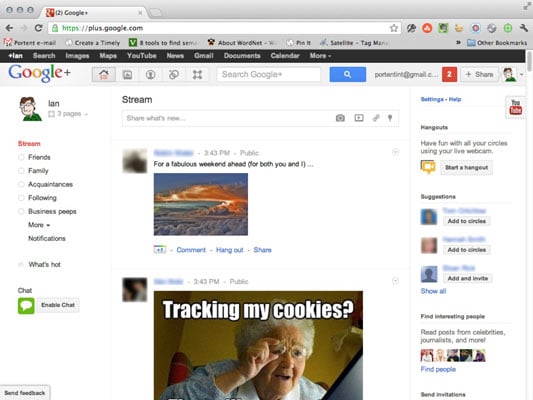
You can comment on, share, or +1 posts that appear in your stream. When you do, the person who posted the content receives a notification. If you comment, all the other folks who commented on that post receive a notification via their Google+ account that you commented, too.
That tends to lead to long discussions over interesting stuff. Often, you see thousands of comments on a single post. It’s a very powerful toolset for interacting with other people.
If you want to grow your Google+ audience, though, you need to post. Like Facebook, Google+ lets you post text, links to other content on the web, photos, and videos.
To post, follow these steps:
Click in the Share What’s New field at the top of your stream.
Type your message.
Select the circles that you want to share this message with.
Click the Share button.
Your shared content appears in the home streams of everyone within the circles you selected, as well as on your profile page.
The Google+ interface is still changing daily. Click around and explore. You’ll probably find a bunch of new tools that didn’t exist when this was written.

Web Design & Development Glossary
AJAX
asynchronous JavaScript and XML. A technique used in web page development.

Web Design & Development Glossary
API
application programming interface. A set of rules programs use to communicate with each other.

Web Design & Development Glossary
color stop
A special element that indicates a color to be added to a gradient.

Web Design & Development Glossary
FTP
File Transfer Protocol. A network protocol useful for transferring files in a client-server relationship.

Web Design & Development Glossary
HTML
HyperText Markup Language. The predominant language for building web pages.

Web Design & Development Glossary
HTTP
HyperText Transfer Protocol. The primary networking language for the Internet.

Web Design & Development Glossary
PHP
PHP Hypertext Processor. A scripting language that works well within HTML.

Web Design & Development Glossary
socket
A technology that allows remote computers to maintain a persistent connection in order to communicate with each other.

Web Design & Development Glossary
sprite
An graphic object on a web page that will be manipulated in real time.

Web Design & Development Glossary
SQL
Structured Query Language. A programming language useful in managing relational databases.

Web Design & Development Glossary
stateless protocol
An Internet procedure that completely breaks the connection between the client and the server after a transaction, meaning that the next transaction will require an entirely new connection.

Web Design & Development Glossary
Telnet
A network protocol useful in interactive, text-oriented communications.

Web Design & Development Glossary
W3C
World Wide Web Consortium. The organization that sets international standards for the World Wide Web.