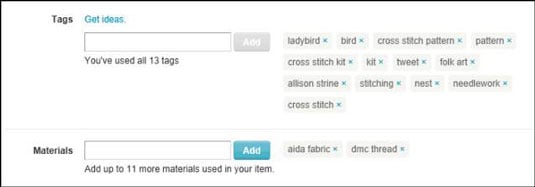
In addition to incorporating keywords into your Etsy item listings, you must add tags. A tag is a word or short phrase, called metadata, that is attached to your item. Etsy uses these tags to help shoppers locate your item. Think of a tag as being the yin to a keyword’s yang.
For example, suppose that you’ve tagged your item with the term bottle cap. If someone types bottle cap when performing an Etsy search, your item will be among the results.
Because tagging is so critical to Etsy’s search functionality, it’s crucial for you to apply strong tags to your listing. When deciding what tags to apply, ask yourself what keywords you would enter if you were searching for your item. Also, keep an eye on your Shop Stats to find out what search terms people are using to find your items.
Start with the most obvious terms first. For example, suppose that you’re selling a hand-sewn handbag. You may apply tags such as purse and handbag. Next, you may apply tags that indicate the style of the handbag — say, formal, casual, Goth, hippie, or whatever. Then you may add tags to convey the bag’s size (large), texture (quilted, shiny, matte), and color (ochre, navy).
You may also add tags to indicate any motifs used in the purse (think Betty Boop, owls, or race car). Finally, you may apply tags that reflect materials used (twill, satin, wool, leather, and so on) and who the item is for (women, men, children, and so on).
If your piece is for a mature audience, you must tag it with the word mature.
One more thing: It doesn’t hurt to use some of the keywords from the item title and description, as well as the attributes you’ve set as tags.
As you know, tagging is critical to Etsy’s search functionality. To tag your listing, follow these steps:
Type a tag for your item in the Tags field and click the Add button.
Repeat Step 1 until you’ve added all appropriate tags.
You can apply as many as 13 tags to your listing. To maximize the chances of buyers finding your item, you want to use as many tags as you’re allowed. If you run out of ideas for tags, turn to your trusty thesaurus for help. Also, it’s okay to use phrases.
To indicate the materials used in your piece, type a material in the Materials field and click the Add button.
Repeat Step 3 until you’ve added all appropriate materials.
You can apply as many as 13 materials to your listing. Enter as many materials as you can.