
You can use the X= editor in your TI-84 Plus calculator to define some equalities and inequalities. Equalities and inequalities of the following form are defined in the X= editor the same way inequalities are defined in the Y= editor:

To access the X= editor, follow these steps:
If you are not currently in the Y= editor, press [Y=] to get there.
Repeatedly press the up-arrow key until the cursor is on X= in the upper-left corner of the Y= editor.
This is illustrated in the first screen.
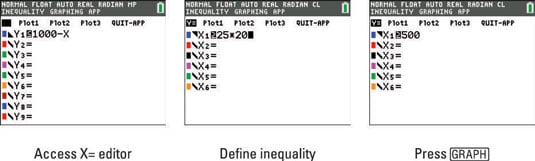
Press [ENTER] to access the X= editor.
The number N in the inequality can be entered as an arithmetic expression, as illustrated in the second screen. That expression is evaluated by the calculator after you press [ENTER], the up-arrow key, or the down-arrow key as illustrated in the third screen.
To return to the Y= editor from the X= editor, repeatedly press the up-arrow key until the cursor is in the upper-left corner of the screen, and then press [ENTER].
When you exit the Inequality Graphing app, all entries made in the X= editor are erased.