
Communication is the single most critical factor to ensuring the success of your Etsy business. After your fabulous inventory catches your buyers’ attention, your prompt and friendly communication — whether it’s via e-mail or an Etsy convo — will keep them coming back for more.
A convo — short for “conversation” — is a communication with another member using Etsy’s internal messaging system. You can use convos to communicate with any other Etsy member. To access your convos, click the Conversations icon that appears in the Etsy header bar; the Conversations page appears.
You can also set up Etsy to send you an e-mail anytime you receive a message via convo. Here’s how:
Click the Conversations icon.
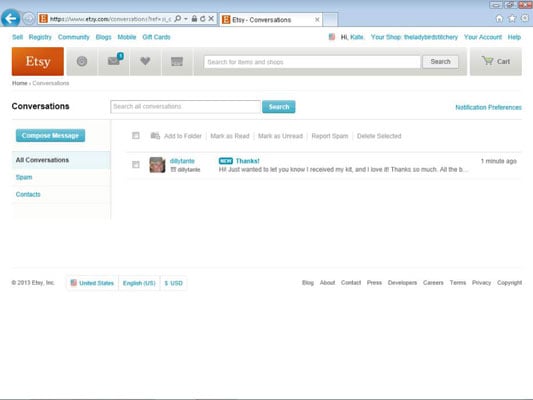
The Conversations page opens.
Click the Notification Preferences link.
The E-mails page opens.
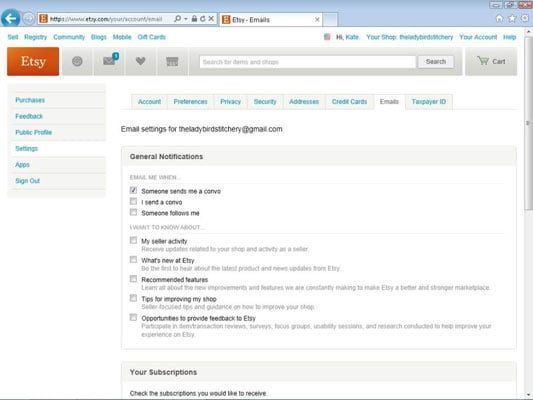
Click the Someone Sends Me a Convo check box to select it.
Click the Save Settings button.
Etsy saves your settings.
When it comes to communicating with buyers, you must strike a balance. Communicate too little, and your buyers may conclude that you don’t care about your customers. Communicate too much, and your buyers may perceive you to be a nuisance.
It’s a good idea to set up a separate e-mail address for correspondence on Etsy. That way, you can keep all your business-related messages in one place. Also, set up Etsy to forward convos to your dedicated shop e-mail address.
Answering customer questions
Even if you upload five spectacular photos of your item and compose a listing description with enough detail to satisfy Tolstoy himself, prospective buyers will still have questions about your piece.
Try to respond to all questions within 24 hours. Quickly replying to e-mails and convos containing queries from potential buyers does more than just help them determine whether your item is right for them; it reassures them that you’re a seller they can count on.
When communicating with customers, keep things simple. Providing too much information may confuse them. Focus on communicating the information that will be most helpful to the customer.
Give thanks
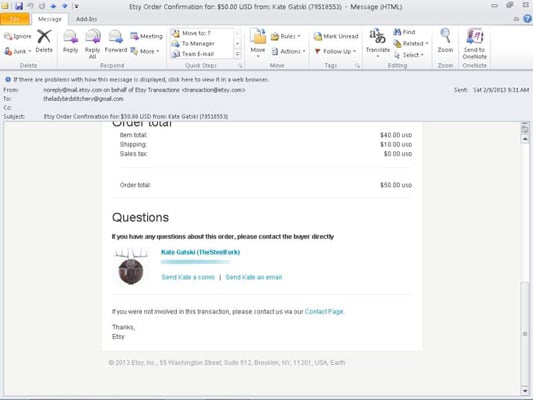
As you may know, Etsy sends you a notification e-mail when someone purchases an item from your Etsy shop. When you receive this e-mail, you should contact the buyer to thank him for his purchase and to confirm that you’ve received payment for it. While you’re at it, give the buyer some idea of when he can expect to receive the item.
On Etsy, as in life, simple courtesy goes a long way! Saying thank you is key to keeping your customers happy.
You can contact the buyer in one of two ways:
E-mail: Etsy includes the buyer’s e-mail address in its notification e-mail. You can also access the buyer’s e-mail by hovering your mouse pointer over the Your Shop link found along the top of every Etsy page and choosing Sold Orders; then find the listing for the item in question, click the buyer’s name, and click her e-mail address in the list that appears.
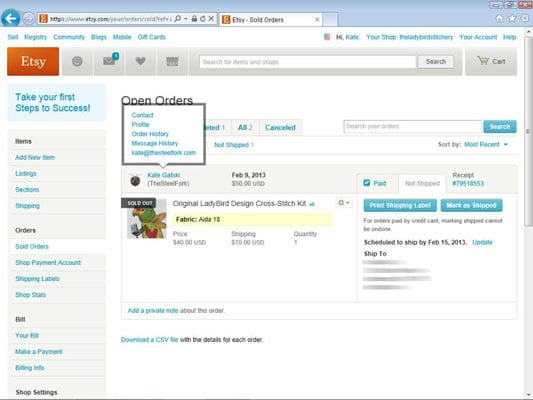
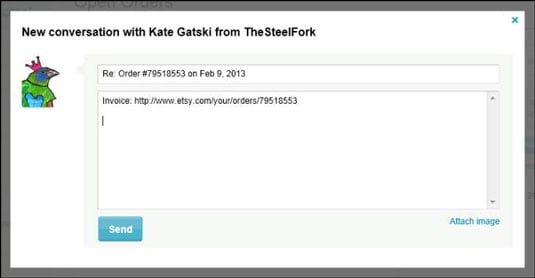
Convo: You can use Etsy to hold a convo with a buyer (or any other Etsy user) right on the site. To initiate a convo with your buyer, click her name in the Orders page as before, but click Contact in the list that appears. When the New Conversation dialog box opens, type your message and click Send.
To launch an Etsy convo with any other Etsy member, open that person’s Etsy page and click the Contact link under his name.
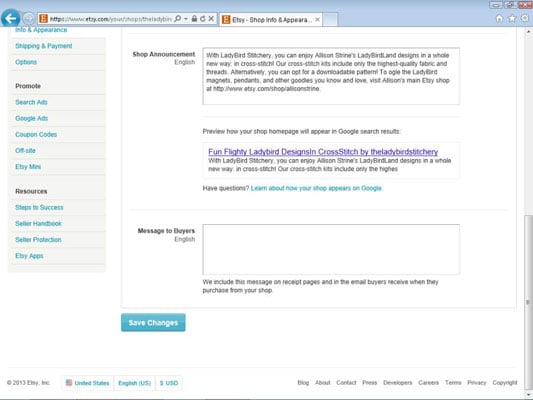
If you want, you can configure Etsy to include some special text in the transaction notice that buyers receive when they purchase from your shop. To set up your Message to Buyers, click the Your Shop link that appears along the top of every Etsy page, click the Info & Appearance link under Shop Settings, type your message in the Message to Buyers area, and click the Save Changes button.
You don’t want to use this auto-generated message in lieu of the one you send yourself; instead, use it as one more point of contact.
Double-check the shipping address
Know what’s a major drag? Placing a perfectly packaged parcel in the post — with the wrong delivery address. To avoid this postal pitfall, double-check with your buyer before you ship that the shipping address that appears on the transaction invoice is, indeed, correct. You can do this in your initial convo with the buyer — the one in which you thank him for his purchase.
Etsy makes this easy by enabling you to send a message right from the Open Orders page. Simply click the Mark as Shipped button next to the item in question, click the Add Shipping Notification button, and type your note to the buyer in the dialog box that opens.
How did they find you?
In the course of communicating with your buyers, whether it’s in your initial convo or later in the process — for example, when you ship the item — ask how they found you. This info can help you determine how well your marketing strategy is working — which is critical to the long-term success of your Etsy shop.
How to communicate with foreign buyers
Especially if you sell internationally, you must be prepared to correspond with buyers who are not native English speakers. Even if you sell only in the United States, you’ll run across the occasional transplant. To ward off misunderstandings when communicating with foreign buyers, keep these points in mind:
Keep messages brief and simple. Using long, complex words and sentences will almost certainly create confusion.
Steer clear of slang. Including nonstandard English is just asking for trouble. At best, your customer may misunderstand you. At worst, you may inadvertently offend her.
Avoid abbreviations and jargon. Spell out what you want to say, using clear, standard language.