
In certain circumstances, you, as an Etsy shop owner, can cancel an order. For example, you may cancel an order if the buyer fails to pay, if both you and the buyer agree to cancel the transaction prior to shipment, if you can’t complete the transaction, if the item was lost in transit, or if the buyer returned the item. When you cancel an order, Etsy refunds your transaction fee.
If you want to leave feedback for the order, you need to do so before canceling it. After an order is canceled, you can’t leave feedback for it.
To cancel an order, follow these steps:
Hover your mouse pointer over the Your Shop link that appears along the top of every Etsy page.
Click Sold Orders in the list of options that appears.
The Open Orders pages opens.
If the item has already been shipped, click the All Orders tab.
Click the Receipt number link on the right side of the listing entry.
A page containing information about the order opens.
If the item was purchased via Direct Checkout, click the Manage Order menu and choose Cancel Transaction. If a different payment method was used — PayPal, check, money order, or what have you — click the Cancel a Transaction link.
The Cancel Transactions page appears.
Click the Reason for Canceling Transaction drop-down list and choose the reason for the cancellation.
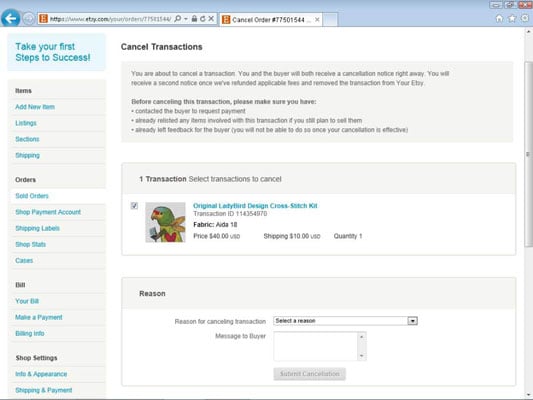
Answer the questions that appear.
The precise questions that appear depend on the reason you select in Step 5.
If you want, type a message for the buyer in the Message to Buyer field.
Click the Submit Cancellation button.
After you submit the form, Etsy finalizes the cancellation (it may take up to 48 hours), notifies you and the buyer that the cancellation has occurred, credits your account with any fees associated with the order, and moves details about the transaction to the Canceled tab on your Sold Orders page.
One more thing: Occasionally, you may come across a buyer who requests a cancellation. It’s up to you whether you grant her request. If you do, you can follow the same steps outlined here.