
How to Add Still Images to Movies in iMovie 09
When you're making a movie with iMovie 09, still images come in handy as impressive-looking titles or behind ending credits. (Make sure you list a gaffer and a best boy to be truly professional.) However, you can also use still images to introduce scenes or to separate clips according to your whim.
Here are two methods of adding stills to your movie:
Adding images from iPhoto: Click the Photo Browser button in the Browser toolbar (or press Command+2) and you’ll experience the thrill that is your iPhoto Library, right from iMovie. You can elect to display your entire iPhoto Library or more selective picks, such as specific albums or Events. When you find the image you want to add, just drag it to the right spot in the Project pane.
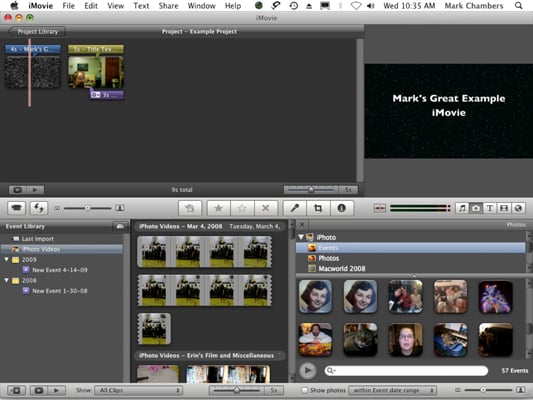
Pulling still images from iPhoto is child’s play.
Importing images from your hard drive: If you’re a member of the International Drag-and-Drop Society, you can drag TIFF, JPEG, GIF, PICT, PNG, and PSD images directly from a Finder window and drop them into the Project pane.

Macs and OS X Glossary
Address Book
The place for addresses, phone numbers, and e-mail addresses on the Mac. You can also add a picture and note about the person.

Macs and OS X Glossary
Bluetooth
A short-range wireless technology that lets your Mac communicate with other compatible gadgets, from up to 30 feet away.

Macs and OS X Glossary
ColorSync
A printer setting that lets you add black and white, blue tone, sepia, or other filters.

Macs and OS X Glossary
Dashboard
A translucent screen that lays on top of your desktop and houses clever little applications called widgets.

Macs and OS X Glossary
desktop
The whole of your Mac’s computer screen. Also called the Finder.

Macs and OS X Glossary
Discoverable mode
Helps other Bluetooth devices find your Mac.

Macs and OS X Glossary
Dock
The colorful bar on the bottom of the Mac screen. It’s a rough cross between the Windows taskbar and the Start menu.

Macs and OS X Glossary
double-clicking
Left-clicking twice in rapid succession while keeping the cursor in the same location.

Macs and OS X Glossary
dragging
Positioning the cursor on top of a symbol or icon and then holding down the mouse button and rolling the mouse across your desk, which moves the symbol or icon to a new location.

Macs and OS X Glossary
Exposé
A Mac feature that, with a click of a button, organizes your Mac desktop.

Macs and OS X Glossary
FileVault
A Mac feature that automatically scrambles, or encrypts, the data in your Home folder.

Macs and OS X Glossary
FireWire
A speedy connector often used with digital cameras.

Macs and OS X Glossary
function keys
Housed on the top row of the Mac keyboard, the keys with the letter F followed by a number.

Macs and OS X Glossary
iCal
The Mac’s built-in calendar.

Macs and OS X Glossary
iDVD
The application that lets you burn movies onto a disk.

Macs and OS X Glossary
iMac
A Mac desktop computer.

Macs and OS X Glossary
iPhoto
The application where you store and touch up digital images.

Macs and OS X Glossary
iSync
The application that keeps your calendar, Address Book, and Internet bookmarks synchronized across multiple devices.

Macs and OS X Glossary
iTunes
Apple’s renowned musical jukebox.

Macs and OS X Glossary
iWeb
The tool that lets you create personal Web sites, blogs, and podcasts.

Macs and OS X Glossary
Mac Mini
Apple’s budget desktop computer. Weighing less than 3 pounds, it’s portable, but not in the same sense as a notebook.

Macs and OS X Glossary
Mac OSx
The operating system that Apple included with all new Mac computer systems since 2002.

Macs and OS X Glossary
Mac Pro
A Mac desktop intended for professionals facing demanding graphics and other computing tasks. Its arrival completed the transition of the Mac line to Intel processors.

Macs and OS X Glossary
MacBook Air
Apple’s super-thin Mac. Encased in aluminum with a 13.3-inch display, Air measures just 0.16 inches at its skinniest point and just 0.75 inches at its thickest. But it still boasts a full-size keyboard and very good battery life.

Macs and OS X Glossary
MacBook, MacBook Pro
Apple’s successor to the PowerBook.

Macs and OS X Glossary
Mail
Apple’s built-in calendar.

Macs and OS X Glossary
MobileMe
The application that keeps your e-mail, contacts, and calendar synchronized, no matter what device you’re using.

Macs and OS X Glossary
operating software
The software that makes a Mac work.

Macs and OS X Glossary
parental controls
Safety features that let you place limitations on your child’s computer use.

Macs and OS X Glossary
phishing
A form of Internet fraud where identity thieves, posing as a respectable financial or Internet company, tries to dupe you into clicking phony links to verify personal or account information.

Macs and OS X Glossary
Safari
The Mac’s Web browser.

Macs and OS X Glossary
Smart Groups
A way to group contacts in your Address Book.

Macs and OS X Glossary
Smart Mailboxes
Searches for e-mail that matches specific search criteria.

Macs and OS X Glossary
Spotlight
The Mac’s search technology.

Macs and OS X Glossary
trackpad
The smooth surface below your Mac keyboard that’s your laptop’s answer to using a mouse.

Macs and OS X Glossary
USB port
The place on your Mac where you plug in devices you want to connect, such as printers, scanners, digital cameras, and more.

Macs and OS X Glossary
Voiceover
A screen reader designed to make using a Mac easier by speaking the contents of the screen.

Macs and OS X Glossary
wireless network
A network that isn’t connected by wires but uses radio waves, instead.
Comments (0)
Leave a Reply