How to Add an Excel 2007 Macro to the Quick Access Toolbar

You can assign a macro created in Excel 2007 to a custom button on the Quick Access toolbar and then run it by clicking that button. This provides quicker access to a macro than using the Macro dialog box.

1

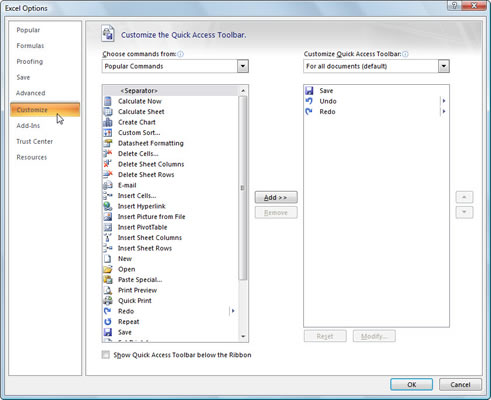
Click the Office Button and then click the Excel Options button.

The Excel Options dialog box appears.

2

Click the Customize tab.

The Customize options appear in the right pane.

3

Click Macros in the Choose Commands From drop-down list box.

Excel lists the names of all macros created in the current workbook and those saved in the PERSONAL.XLSB workbook in the Choose Commands From list box.

4

Select the name of the macro and click the Add button.

The macro appears in the list box on the right side of the dialog box.

5

Click the macro name in the list box on the right and then click the Modify button.
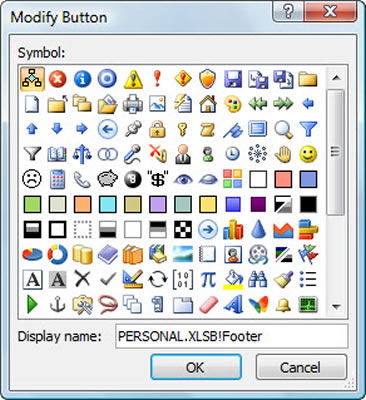
The Modify Button dialog box appears.

6

Select an icon to use for the button.

This is the icon that will appear on the Quick Access toolbar to represent your macro.

7

Click OK two times.

Both dialog boxes close and the macro button appears on the Quick Access toolbar.

To remove the macro button from the Quick Access toolbar, simply right-click the button and select Remove from Quick Access Toolbar.

Comments (10)

  1. Posted by Joan Manley
    Is it possible to make your own custom buttons for macros in Excel 2007 as you could in Excel 2003? I have many macros that I use extensively in Excel 2003 and would like to do the same in Excel 2007. Thank you, Joan Manley
  2. Posted by Himanshu
    I am also facing the same proble, If you could find then it would be really fantastic. Please chare the solution with me if you have any as on date. regard Himanshu
  3. Posted by Andy
    I am regretting ever moving to Excel 2007. The inability to customise your icons to reflect what the macro does is the biggest backward step Microsoft have ever taken. what good is a smiley face or a pink square as a button to activate a macro? I have dozens of personal macros for commands Excel does not readily do and without meaningful images on the QAT buttons it is useless.
  4. Posted by Mike
    I've search the internet and still haven't found a way to customize icons for macros beyond the meaningless set Microsoft provides. Just another limitation to add to my long list of Office 2007 grievances.
  5. Posted by Sushil Dayal
    Dear Sir As above illustration we can put sign or symbol for macro can we put name inplace of symbol or sign? Regards & Thanks Sushil Dayal
  6. Posted by phentermine 37.5mg blue and white tab
    zVJoIB If you have to do it, you might as well do it right.
  7. Posted by Kelly gibbs
    I created a quick access button for my macro. When I open up the required excel file and I click on the quick access button, I receive a security warning macros are disablec and I select ok and then my macro runs. I can make this work on a number of PC's but I have one that when I select the quick access button, I do not get the security warning to enable the macro and I cannot run the macro on the open file. Help please
  8. Posted by Lance
    Kelly, The problem PC possibly has the macro security setting too high. On the PC, open Excel and go to the developer tab. Click on macro security and set the macro setting to disable WITH notification. If the Developer tab does not show in this machines version of Excel then go to Office - excel options - popular and toggle on the 'show develpoer tab in ribbon' Hope that helps. Oh and I'm also in the 'mad about no button editor' band wagon.
  9. Posted by sivaraj
    i need coding to run a macro in all the worksheets in a work book. help me out to get it. Thanks in advance.
  10. Posted by DDW_23
    With the many macros I have that were created in 2003, and now I'm using 2007, I really need to create custom bars for just my macros alone!! I have yet to find a way to do that!!!

Leave a Reply


Post Comment

Connect with For Dummies

Sign Up for RSS Feeds

Computers & Software

Inside Dummies.com