
For Seniors: How to Set a Reminder for Computer Maintenance
Keeping your computer in tip-top shapes helps you avoid system crashes. If you’re the forgetful type, you can even set a reminder for your computer’s maintenance tasks.
Choose Start→Control Panel→System and Security and then click Schedule Tasks in the Administrative Tools window.
The Task Scheduler dialog box appears.
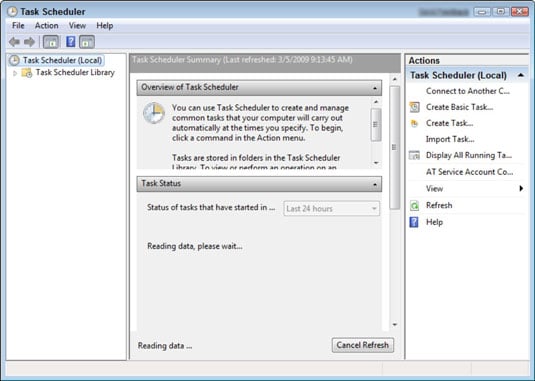
Choose Action→Create Task.
The Create Task dialog box appears.
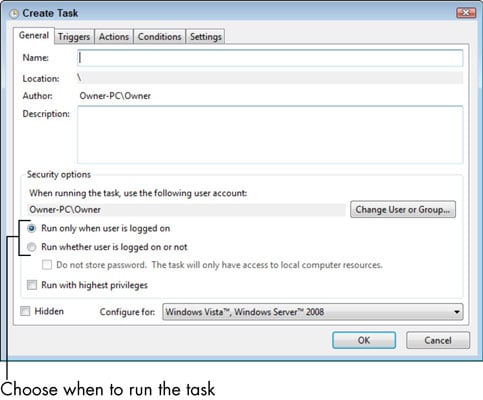
Enter a task name and description. Choose when to run the task.
You have two choices: only when you are logged on or whether you’re logged on or not.
Click the Triggers tab and then click New.
The New Trigger dialog box appears.
Choose a criteria and any settings in the Begin the Task drop-down list. Click OK.
You can use the settings to specify how often to perform the task as well as when and at what time of day to begin.
Click the Actions tab and then click New.
The New Action dialog box appears.
Choose the action that will occur from the Action drop-down list and click OK.
Your choices include starting a program, sending an e-mail, or displaying a message. Depending on what you choose here, different action dialog boxes appear. For example, if you want to send an e-mail, you get an e-mail form to fill in.
Click the Conditions tab and enter any other settings.
If you want to set conditions in addition to those that trigger the action that control whether it should occur, the Conditions tab is where you do so.
Click the Settings tab and make settings that control how the task runs. After you complete all settings, click OK.
Your task is now saved.
If you like a more wizard-like interface for building a new task, you can choose the Create Basic Task item from the Action menu. This walks you through the most basic and minimal settings you can make to create a new task.
When the cell references in a formula don’t change when you move or copy it. To make a reference absolute, add dollar signs before the column letter and before the row number. So, for example, an absolute reference to C1 would be =$C$1.
Text that has a diagonal slant.
A utility used to spot and erase computer viruses from a system.
A placeholder for a number, text string, or cell reference. Each function has one or more arguments. The arguments for a function are enclosed in a set of parentheses.
The height-width proportion for a box.
A catchall term for music and other sound files, such as books on CD.
The length of time it takes a laptop battery to run out of juice.
The lines that appear around one or more sides of each cell.
Consists of the cell’s column letter and row number.
How the text interacts with the available space in the cell.
The very small, very high-tech semiconductor chip that acts as the brains of a computer. The CPU is stored in a computer tower.
To press and release the left mouse button.
To press and continue to hold down the left mouse button and then move (drag) the mouse to another location.
Predrawn generic artwork. Microsoft provides many clip art files for free with its Office products.
A temporary holding area in Windows.
The red button with the X in the top-right corner of the window. Click the Close button when you are done with the window. Close is also called Quit and Exit.
Compressing a file or folder reduces a large file or folder to a more manageable size.
When you roam the Internet, Web sites you visit download information, known as cookies, to your computer to temporarily allow you to access sites or services or to. Your browser stores these temporary Internet files on your hard drive.
Stores your work in a particular application.
Typically have a large tower that contains the computer’s central processing unit (called a CPU). The keyboard, mouse, and monitor are separate. Desktop computers take up more space than laptops and are not portable, but they’re usually less expensive.
Icons that reside on the desktop and provide a shortcut to opening a software program or file.
Windows has built-in desktop themes that you can apply quickly to change the look of your computer’s desktop. These desktop themes save sets of elements that include menu appearance, background colors or patterns, screen savers, and even mouse cursors and system sounds.
Two rapid clicks of the left mouse button.
Each Office application has a variety of viewing options available. Each view is suited for a certain type of activity in that application. In Word, Draft view is speedy to work with and presents the text in a simple one-column layout.
Also called shading, the color or pattern that fills the background of one or more cells.
Keeps other people or programs from accessing your computer without your permission.
A standard way of making each letter. (It’s also called a typeface.)
Controls the height of the letters. The font size is based on the distance from the top of the tallest letter to the bottom of the lowest letter, measured in points.
A math expression that begins with an equals sign, such as =2+1. Formulas can also contain cell references. For example, =A2+B2 adds the amount found in cell A2 to the amount found in B2.
In Excel, a function refers to a certain math calculation.
Usually larger than icons, gadgets display information, such as the time (in a clock) or the current weather report.
Computers with more sophisticated sound and image capabilities. These gaming or multimedia models typically require a larger hard disk to handle these functions.
When you look at a Microsoft Excel worksheet onscreen, you see faint, gray-blue lines — gridlines — that separate the rows and columns.
All the tangible computer equipment, such as the keyboard and mouse,
Determines how each line aligns between the right and left margins. The default is left alignment, where each line begins at the left margin.
Describes whether the text is left-aligned, right-aligned, or centered when the cell is wider than needed to accommodate the entry.
When the mouse pointer is over an area where you can place text, it turns into an I-shaped pointer called an I-beam. The shape of the I-beam makes it easy for you to precisely position it, even between two tiny characters of text.
Small pictures that represent programs, which perform functions, or documents such as letters and photos. Icons provide a way to run a program or open a document.
To shift the position of one or more paragraphs in relation to the left and/or right margins.
A little line that indicates where the next action will take place. The insertion point is the flashing vertical marker (cursor) that shows where the text that you type will appear. You can move the insertion point with the arrow keys, or you can click where you want to place it.
A way to chat with others by typing messages and sending them through your computer using a technology called instant messaging. These messages are exchanged in real time
Display recent and frequently used documents and options belonging to a specific program.
Similar to a typewriter keyboard. In addition to typing words, you can use a keyboard to give the computer commands.
Portable, weighing anywhere from two to eight pounds (the lowest weight ones are called netbooks). The monitor, keyboard, and mouse are built into the laptop.
Recorded bits of code that can automate certain activities in a program, but they can also carry viruses.
The space between the edge of the paper and where the text begins. Ideal margins depend on many factors, including the document type, the need to limit the number of pages, and the audience’s needs
Click the Maximize button to hide the desktop and other open windows, to concentrate on this one window, and to see as much of the window’s contents as you can.
Refers to something other than text: Audio and video are examples of media.
A horizontal strip containing various menus, the menu bar appears below the title bar, starting at the left edge of the window. To use a menu, click its name and a vertical list of related items drops down. Then click the item you want to use.
An accessory that provides virtual pens and brushes for use in play, serious art, or art therapy.
Shrinks or hides the window contents. The program that the window contains is still running and open, but the window is out of sight. You’ll still see the program’s icon in the taskbar. Click the Minimize button when you want to ignore a particular window but aren’t actually done with it.
Displays images on its screen, such as the Microsoft Windows desktop or a document in a software program.
A tactile device that you use to give your computer commands. You move the mouse around your desk with your hand, which moves a pointer around on-screen. Using this pointer, you can click items like buttons that cause an action, or click the screen and drag the mouse to select text or an object to perform an action on it.
Cells that don’t border each other.
The dialog boxes used for chart formatting are nonmodal. Any changes you make in them take effect immediately, and the dialog box can remain open while you work on other parts of the worksheet.
Software that runs all the programs and organizes data on your computer.
Refers to the direction of the text. By default, text runs horizontally from left to right.
Determines whether the height or the width of the page is greater. If the text is parallel to the narrow edge, that’s Portrait. If it’s parallel to the wide edge, that’s Landscape.
An array of colored squares from which you can choose a color.
Click and drag the photo to move it.
Accessories such as a printer, speakers, webcams, and microphones. These items may or may not come with your computer when you buy it, but your computer does come with slots (called ports) where you plug in various peripherals.
1. (noun) One point (pt) is 1/72 of an inch. 2. (verb) To move the mouse pointer to a specified location without clicking.
A type of laptop mouse. A pointing stick is a small button located among your computer’s keys.
A collection of one or more slides saved in a single data file.
Installed software installed that uses certain settings to tell your computer how to find the printer and what to print.
Your computer contains a processor contained on a computer chip. The speed at which your computer runs programs or completes tasks is determined in great measure by your computer’s processor speed.
A group of one or more cells. You refer to a range by the address of the upper leftmost cell in the range, followed by a colon, and then followed by the lower rightmost cell in the range. For example, the range consisting of cells A1, A2, B1, and B2 is written as A1:B2.
To turn off and turn back on your computer.
When you move or copy a formula, Excel automatically changes the cell references to work with the new location.
The button that appears after you click the Maximize button; it replaces the Maximize button. Click the Restore button to return the window to its previous size, which is in between maximized and minimized.
A group of settings that were in effect last night, last week, or at some other time.
All Office 2010 applications have a common system of navigation called the Ribbon, which is a tabbed bar across the top of the application window. Each tab is like a page of buttons. You click different tabs to access different sets of buttons and features.
A single press and release of the right mouse button.
Text that is straight up-and-down.
A thin sheet of plastic that you place across your monitor that can help prevent scratches and, as a bonus, keep your screen clean, as well.
Controls how sharp and detailed a picture your screen displays.
Animations that appear after your computer has remained inactive for a time.
A pop-up box that tells the button’s name and/or purpose. It appears when you hover the mouse pointer over a button.
To roll the a wheel in the center of the mouse up or down to navigate through a document or Web site on your screen. Just roll the wheel down to move through pages going forward or scroll up to move backward in your document.
The blank rectangle you drag in the scroll bar. Its size indicates how much content you can’t see at the moment.
Text that is highlighted is selected, meaning that any action you perform, such as pressing the Delete key on your keyboard or clicking a button for Bold formatting, is performed on the selected text.
A circle or square on the border of the box. Each box has eight selection handles: one in each corner, and one on each side. (The green circle handle at the top of the selected box rotates it when dragged.)
A popular program, program is available on the Internet, that enables you to make online phone calls using your computer.
An individual page of the presentation. The term page isn’t a perfect descriptor, though, because PowerPoint slides are designed to be displayed on a computer screen or with a projector rather than printed.
A combination of one or more content placeholders slots (ports) where you plug in various peripherals
Installed on your computer hard drive, which resides in the computer casing (either in your laptop or, for a desktop computer, in the computer tower). Software is what makes the hardware work or lets you get things done, such as writing documents with Microsoft Word or playing a Solitaire game.
A technology that enables you to speak commands.
Malicious software programs.
Appears along the bottom edge of the window and displays information about the window or its contents.
An accessory that puts yellow notes directly on your computer’s desktop.
Applies to an individual paragraph, or a block of selected text.
A folder you place within another folder.
The sequence of arguments for each function;
This foundational memory, part of which is stored on the system’s hard drive, tells the computer about its world —what disk drives are attached, what other kinds of memory it has, and other details involving all the hardware that makes up the machine.
System Restore, featured in all current version of Windows, is a computer version of a time warp, allowing you to go back from the future to a specific restore.
A configuration file that governs the default settings for the documents that are based on it.
Controls how the text lines up within cells.
A design set that you apply to an entire document or presentation to change several elements at once, including background, color scheme, fonts, and the positions of the placeholders on the various layouts.
The top line of the window, containing the title of the program you’re using. When you use a program to create a document, the name of the document also appears in the title bar.
Below the menu bar, some programs display a toolbar of icons that you can click to perform various functions.
The most common type of laptop mouse, a touchpad is a flat area, located beneath the keyboard.
Essentially an upside-down mechanical mouse with its roller ball built into a mouse body or even into a keyboard. The ball rests loosely in a cavity, where sensors track horizontal and vertical movement.
The flourish that occurs when you transition between one slide and another.
The process of transferring digital photos to your computer.
A USB flash drive store information. They are about the size of a package of gum, and you insert them into a USB port on your computer.
A common type of connection ports.
Describes whether the text aligns with the top or bottom of the cell, or is centered vertically between the top and bottom, when the cell is taller than needed to accommodate the entry.
Uses your computer and Internet connection to place calls.
Tiny, inexpensive video cameras that capture and send your image to another computer.
Protects your computer from unwanted intrusion by malicious programs called spyware.
Makes sure your computer has the most up-to-date security measures in place.


