
You will want to have the appropriate privacy settings if you plan to use Facebook for job searching. To access Facebook’s privacy settings, simply log in, click on the lock icon at the top of the page, and click on See More Settings. You can then change settings that control who is able to look you up, see your personal information, see your timeline posts, and many more specific options.
Most privacy categories on Facebook offer five levels of containment that you can select from. Here they are, in order of least private to most private:
Public
Friends of Friends
Friends
Custom
Only Me
Categorize your friends
Not all friends are created equal. Some people are really close to you, and you don’t want to miss even one thing they post. Other people you know from work, or you simply don’t want them to see everything. Finally, some people make you a bit uneasy when they ask to join your network, like bosses or recruiters.
Thankfully, there are Lists in Facebook for each of these categories.
Close friends: Posts from Friends in this category will always show up on your timeline.
Acquaintances: You can choose to exclude content from these folks on most privacy settings and in audience selection on the timeline.
Restricted: These weary contacts will only see posts and profile elements set to Public.
Add friends to Lists
There are four ways you can drop friends into lists.
Egress: When you send a friend request, hover over the blue Friend Request Sent box for list options.
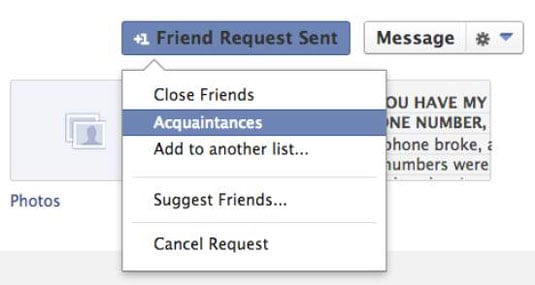
Ingress: When someone sends you a friend request, accept the request then hover over the blue Friend box for list options.
Individually: From your timeline, open up your list of Friends. Next to each profile photo, you see a box with a checkmark next to the word Friend. Hover over it for a list of options.
En Masse: Navigate to Facebook’s List Page and click on the list you want to add a large number of people to. Click on Manage List and then Edit List. From there you can type in the names of anyone you wish to add to that list.
Not all of your friends need to be categorized, just the ones that you feel should be treated differently than most by Facebook.
Make adjustments to your public profile
As a job seeker, you want to be found. But you also want to control what information people can find about you. That’s where your “About” profile comes into play; it allows you to set what personal information people can and cannot see about you.
From your timeline, click on Update Info right next to your name to find the area where you can edit your profile, the About section. You may need to expand this section by clicking on See All, depending on how full it already is.
Complete your Work and Education section as much as possible. This helps Facebook make friend suggestions for you. And who knows what new opportunities old friends can bring!
You can always view how you’re seen by the public or by a specific person by using the View As feature. From your timeline, click on the small gear icon to the right of Activity Log and pick View As. If you pick Public, then you can see how potential employers will see your Facebook profile should they find you.
Privacy settings
Privacy settings have two categories, Who can see my stuff? and Who can look me up? Here are some suggestions for how to configure these elements.
Head on over to your expanded privacy settings by clicking the gear wheel in the top navigation bar and choosing Privacy Settings. Table 13-2 lists how to optimize these for job search.
Timeline and Tagging settings
From your expanded Privacy Settings area, pick Timeline and Tagging from the left navigation area. There you will find the most important Facebook settings to manage.
This category allows you to control who can view (and comment on) the various tidbits you decide to reveal about yourself. It also allows you to restrict who can see the comments other people post on your timeline and what they tag you in. Remember: You can’t always control what your friends post, so you want to be extra careful with these settings.
If someone posts something on your timeline that you don’t want others to see, you can always remove it. When you hover your mouse cursor over the post, a little X appears in the top-right corner. Clicking on it deletes the offending post from your timeline.
You can also control the audience each individual photo album is set to. Head on over to your timeline and click Photos, then click Albums. For example, you may want to share your New Year’s Eve party photos with Friends Only but share your job fair photos with Public. You can set these options whenever you create new albums.
If you already have some photo albums that you want to retroactively change privacy settings for, just click on the audience icon on the bottom right of the album.
Create block lists
Perhaps you have one of those best friends who makes you laugh uncontrollably at his completely inappropriate jokes. Well, this buddy may become an annoying liability during your job search if he insists on posting those jokes to your timeline.
So what’s the cure for ridding yourself of problem posters or immature games? Block ’em. Just navigate to the expanded Privacy Settings page and look for the Blocking category. It gives you several options for various ways you can block other users.